Dsp installation guide – OPHIT DSP Benutzerhandbuch
Seite 2
2
3
DSP Installation Guide
●
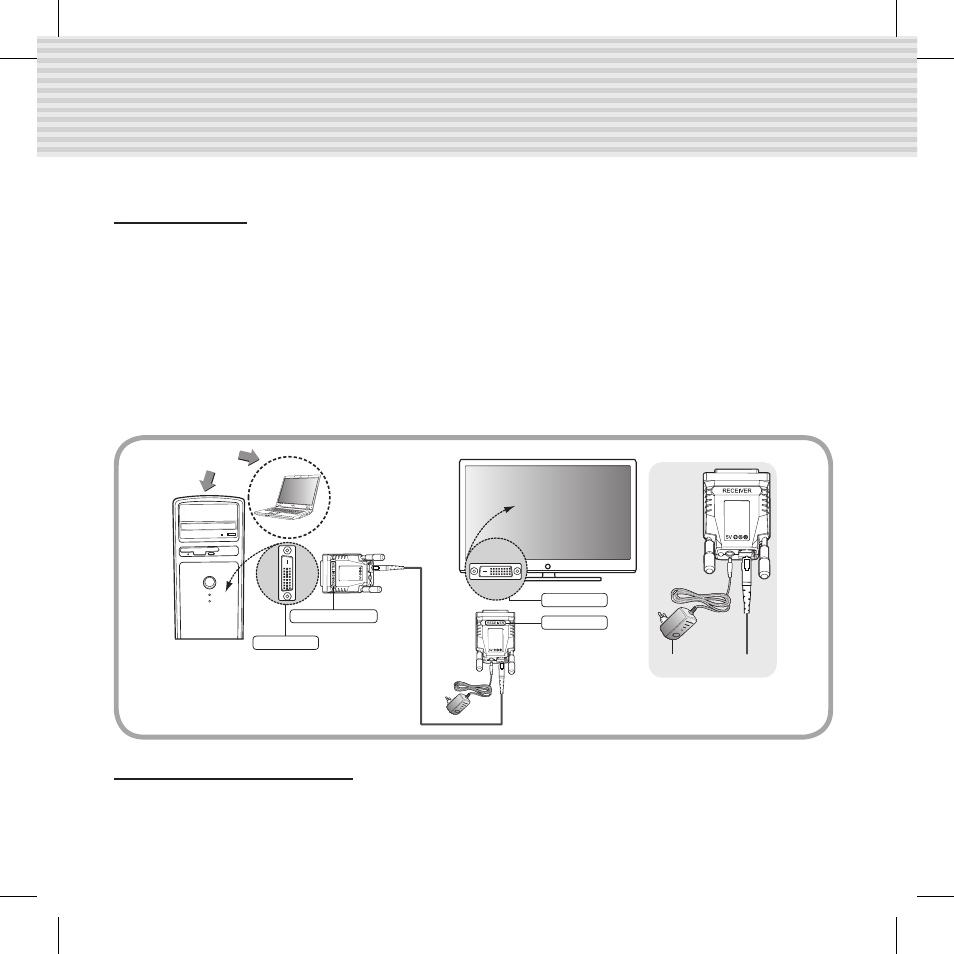
Connection
• Connect product transmitter to the DVI port on your computer.
• Connect Product receiver to the DVI port on your digital display product.
• Connect Multi-mode SC type 1channel standard fiber-optic cable between transmitter and receiver.
• Connect power adapter to the receiver which has been provided.
*Connecting power adapter to the transmitter is option.( In case of power shortage)
• The green LED will appear on the transmitter and receiver, after all the product connections
is/are completed.
- LED On : Power supply and Signal transfer
- LED Blinking : Only Power supply, Signal not transfer(Connections are not completed)
or
DVI Port
DVI Port
TRANSMITTER
Adapter
RECEIVER
●
Contact us (OPHIT USA)
Foreseeson Custom Displays, Inc.
2210E. Winston Road Anaheim, CA 92806
Tel : 714-300-0540, Fax : 714-300-0546, e-mail : [email protected]
DSP.indd 2
2011-09-20 �� 11:10:38