Dolby Laboratories DVD & MP3 Benutzerhandbuch
Seite 14
BASIC OPERATION
14
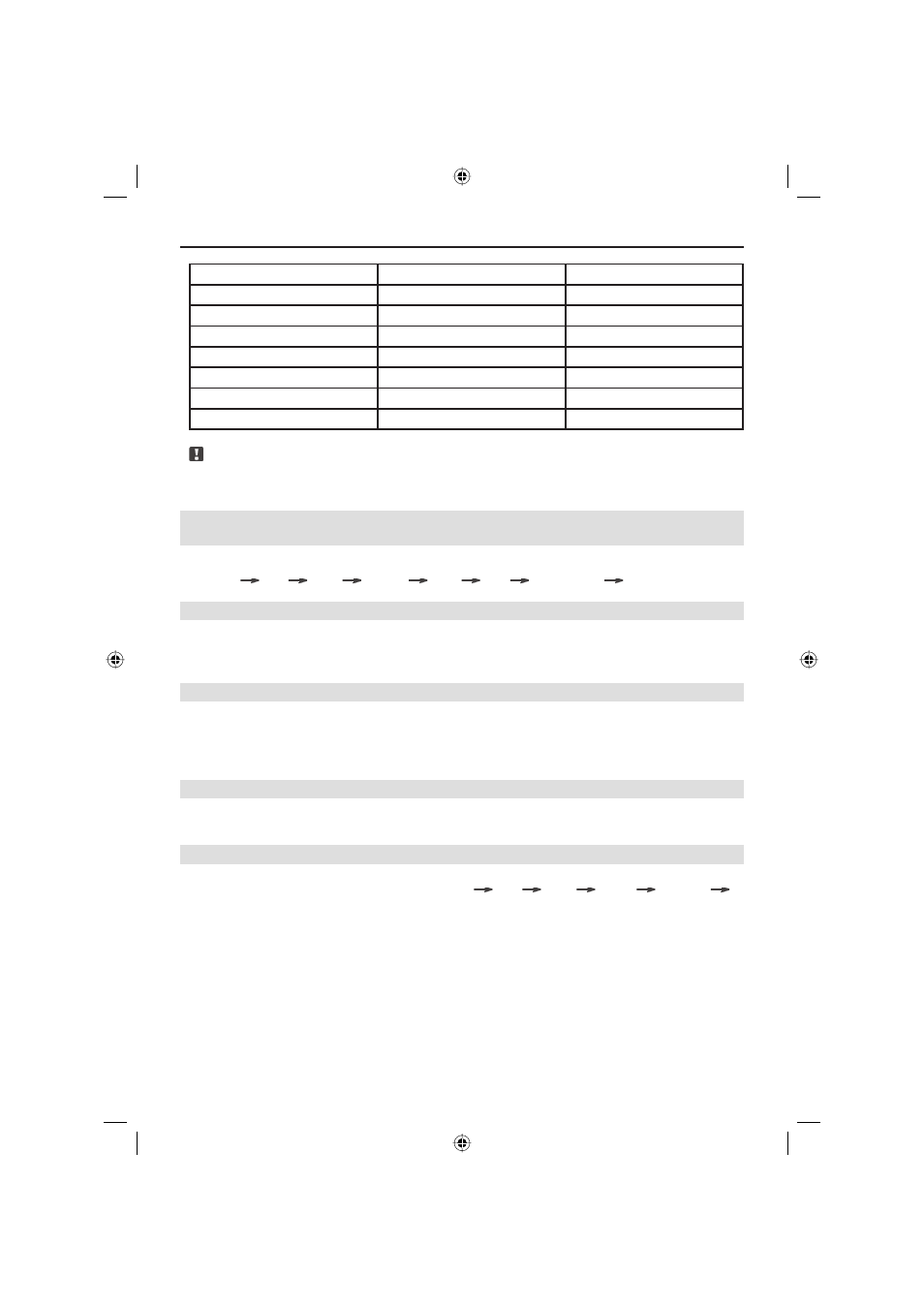
Setup item
Range
Default
Clock mode
12H/24H
12H
Panel detachable
ON/OFF
OFF
Beep ON/OFF
ON
Clock display
ON/OFF
ON
Light in
ON/OFF
ON
LCD flash mode
0~14
14
LCD contrast
0~7
2
Note:
■ If there is no operation within 5 sec or the [DISP] button has been pressed for a little lon-
ger once more, the unit will exit the system setup mode.
SETUP BASS, TREBLE, BALANCE, FADER, LOUD
ANDSOUND EFFECT
■ Press the [SEL/LOC] button to select the audio mode according the following sequence:
Volume
Bass
Treble
Balance
Fader
Loud
Sound effect
Volume
BASS AND TREBLE CONTROL
■ In Bass or Treble mode, rotate the [VOLUME ADJUSTMENT] knob to increase or decrease
Bass/Treble.
■ If this button is pressed for more than 0.5 sec, the value will be continuously adjusted.
BALANCE AND FADER CONTROL
■ In Balance mode, rotate the [VOLUME ADJUSTMENT] knob, to shift the relative volume
to the Left or Right speaker system. In Fader mode, rotate the [VOLUME ADJUSTMENT]
knob, to shift the volume more to the Front or to the Rear speaker system.
■ If this button is pressed for more than 0.5 sec, the value will be continuously adjusted.
LOUDNESS CONTROL
■ In Loud mode, rotate the [VOLUME ADJUSTMENT] knob to activate or turn off the
Loudness function.
SOUND EFFECT CONTROL
■ In Sound Effect mode, rotate the [VOLUME ADJUSTMENT] knob to select a sound effect
according to the following sequence: Normal
FLAT
JAZZ
ROCK
CLASSIC
POP
ZE-200DVD Manual E+D_c.indd 14
ZE-200DVD Manual E+D_c.indd 14
26.05.2004 14:28:21 Uhr
26.05.2004 14:28:21 Uhr